
Start the Release in Your DAW

BeatOps Release is a VST3/AU plugin on your master bus. Bounce your beat and it is captured, catalogued and published, without you leaving the session. Releasing stops being a chore and your time stays where it matters, on the next beat.
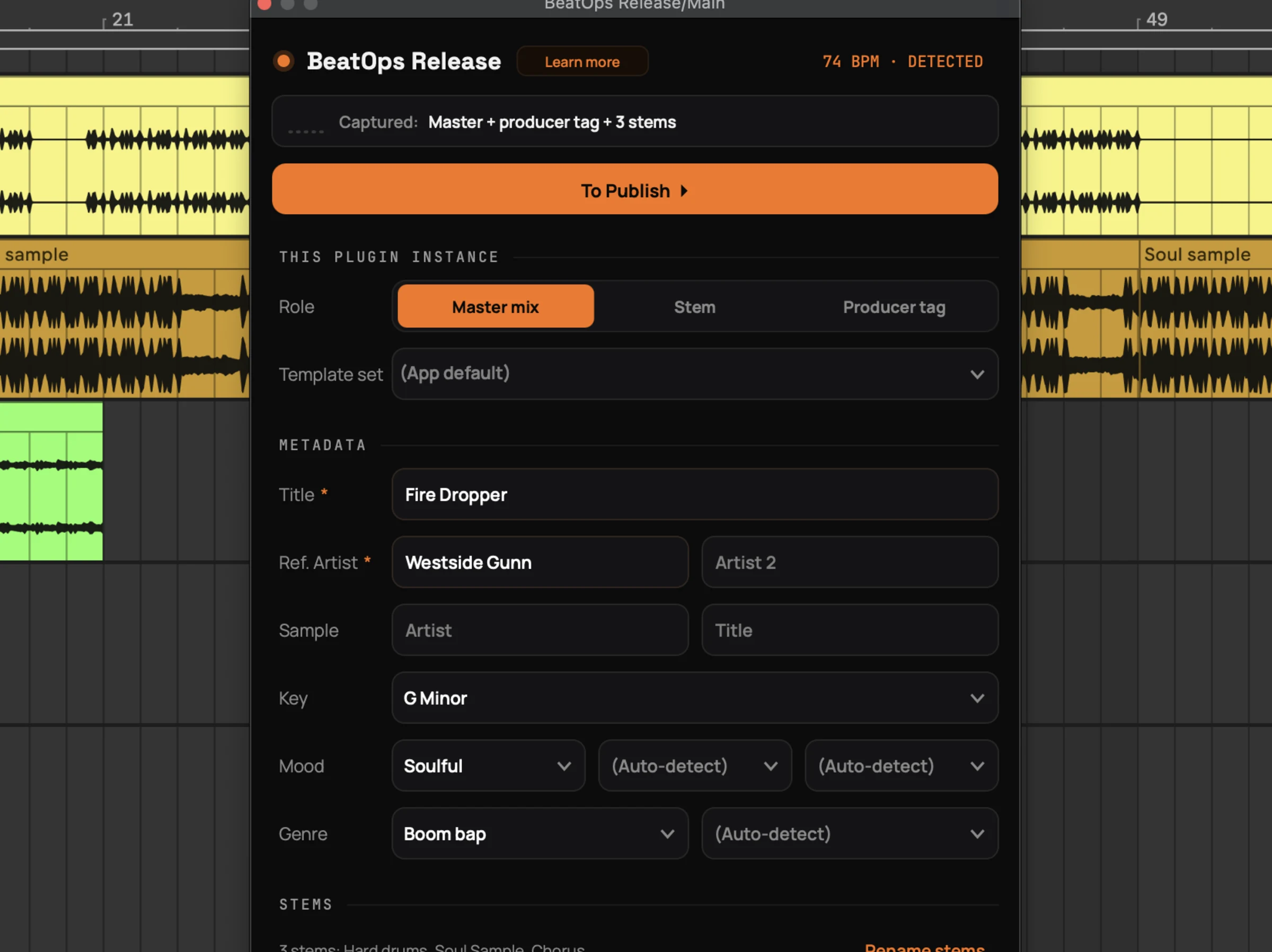
  • One bounce, the full package: a clean WAV, an MP3 with your producer tag, and all your stems, ready to sell.
  • Works where you work: tested in seven DAWs including FL Studio, Ableton and Logic, on macOS and Windows.
  • Free on every plan: the plugin installs from inside the app and is included on the free plan too.
BeatOps Release on the master bus in Ableton Live, showing Export detected with the title, BPM, key and captured stems filled in

Automate Beat Uploads to YouTube, BeatStars & SoundCloud

Connect your YouTube, BeatStars, and SoundCloud accounts and upload directly from BeatOps. No more switching between tabs and copy-pasting.
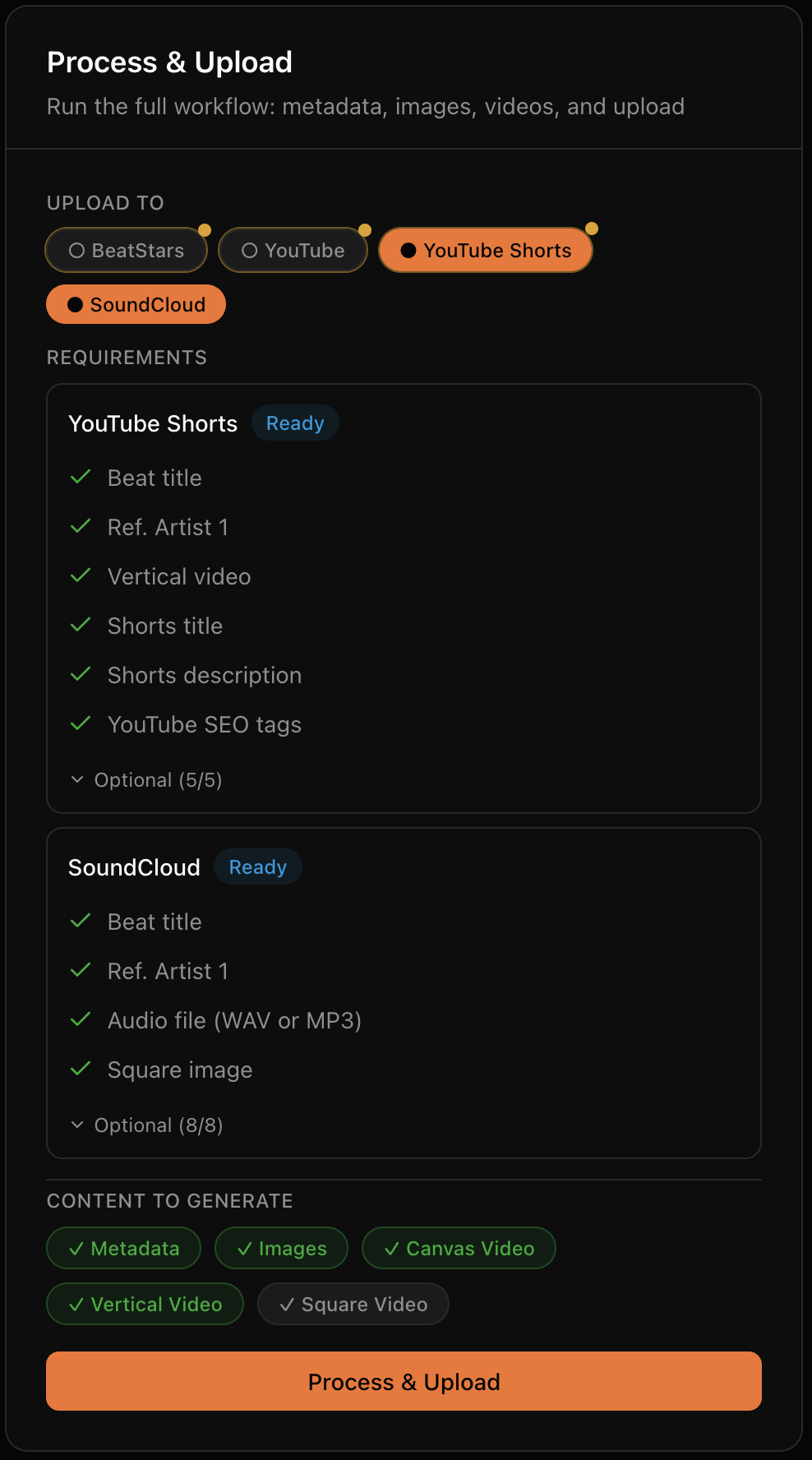
  • YouTube Main: upload full-length beat videos with all metadata.
  • YouTube Shorts: upload vertical videos to a separate Shorts channel, if you want to.
  • BeatStars: upload beats with pricing, tags, and stems.
  • SoundCloud: upload tracks with artwork, tags, and descriptions.
  • Scheduling: set specific days and times for uploads. Build a consistent release schedule.
  • Status tracking: see upload progress and get direct links when complete.
BeatOps Process and Upload Flow

Auto-Generate Beat Thumbnails & Videos in Every Format

Your beats deserve visuals that match. BeatOps turns one image into thumbnails and upload-ready videos for every platform, without design skills or editing software.
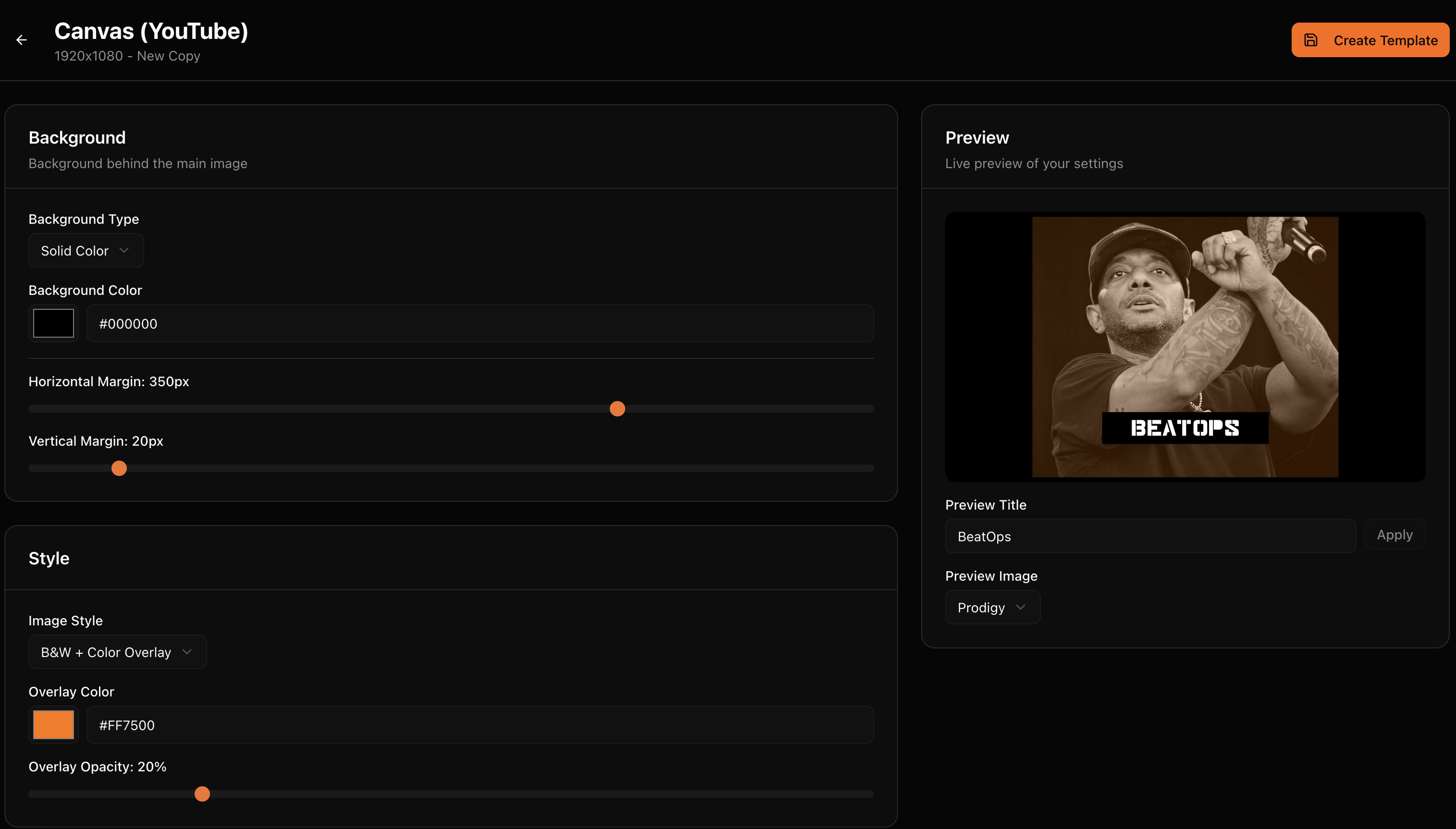
  • Three formats: Square (1:1) for BeatStars, Canvas (16:9) for YouTube, Vertical (9:16) for Shorts, for thumbnails and videos alike.
  • Visual styles: choose from multiple aesthetics: B&W (with color overlay), Cinematic, Film Grain, Warm, Cool, and more.
  • Consistent branding: your style applied to every beat automatically. Same look, zero effort.
  • Auto image search: find relevant images to process automatically or upload your own.
  • Videos included: thumbnails combine with your audio into upload-ready MP4s. Already have a video? Upload it directly instead.
BeatOps Template Editor

Reusable Title, Description & SEO Tag Templates

Templates are the heart of BeatOps. Define your style once, and every beat follows the same format automatically. And when one beat needs something different, you override it, per beat.

  • Title and description templates: for YouTube Main, YouTube Shorts, BeatStars, and SoundCloud, with variables that auto-fill with beat data.
  • SEO tag templates: consistent tags for better discoverability.
  • Template Sets: bundle titles, descriptions, tags and image styles together for different workflows or brands.
  • Per-beat overrides: a different title, a custom description, your own image, a manually edited BPM or key. Any template setting can be overruled for a single beat.
  • Preview before upload: review everything before it goes live. Trust your setup? Enable auto-approve.
"{{ artist }} Type Beat - {{ title }}"

Variables are replaced with actual beat data when generating content.

Export Once, Get Every Version

Only have an untagged master to export? BeatOps adds your producer tag, the audio stamp on the preview you post to YouTube, BeatStars and SoundCloud, and clips a vertical Short loop, all from that one file. Your clean master stays for the buyer.

  • Producer tag, added in the app: BeatOps places your tag, mixes in delay and reverb, and lets you move it on the waveform. Save presets, set a default, or decide per beat on publish: always ask, always tag, or never.
  • Shorts, clipped for you: pick the section that becomes your vertical Short, preview the loop, and BeatOps clips it into an upload-ready 9:16 video.
  • Preview, then publish: hear the tag on the beat and set the Short clip before anything goes live, and change either whenever you want. Prefer hands-off? BeatOps can tag and clip automatically from your saved presets.
Untagged master in. Tagged preview + vertical Short out.

Your tag protects the preview; the clean master stays for the buyer.

Cross-Platform Upload Analytics & Insights

BeatOps tracks your performance across YouTube and SoundCloud, giving you data-driven insights in one dashboard, so you know exactly what to produce next.
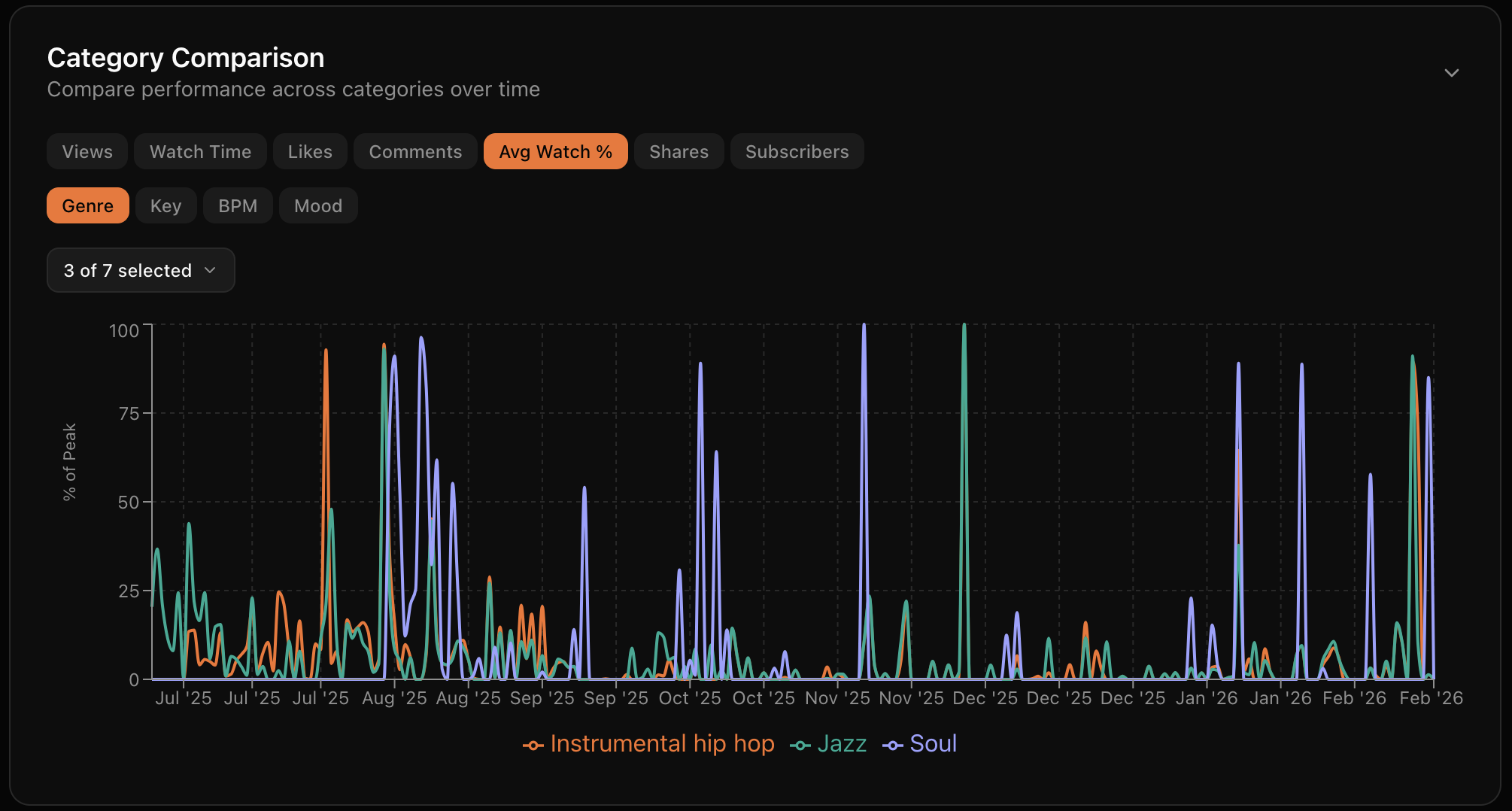
  • Cross-platform dashboard: YouTube and SoundCloud analytics in one view. Views, likes, comments, and engagement at a glance.
  • Performance Insights: see which genres, keys, BPMs, and moods drive the most engagement. Data-driven production decisions.
  • Hidden Gems: find your underrated beats that deserve more attention based on engagement quality.
  • Trend tracking: track how your catalog performs over time. Spot what's growing and what needs a push.
BeatOps Analytics Dashboard

Auto File Detection, Audio Analysis & Metadata

Beats, stems, images, videos: it adds up fast. BeatOps keeps everything organized so you can find what you need when you need it.

  • Auto file detection: drop files in your beats folder. BeatOps scans and imports automatically.
  • Smart metadata extraction: title, BPM, key, and artists parsed from your filename patterns.
  • Audio analysis: BPM, key, mood, and genre detected automatically from the audio itself.
  • Duplicate detection: identifies duplicates by file hash and metadata. No accidental re-uploads.
  • Stems organization: stems automatically linked to their parent beat and zipped for upload.
Organization
Automatic
Audio Formats
WAV / MP3
Detection
BPM + Key + Mood + Genre

Batch Processing, CLI & AI-Native Automation

Process one beat or a whole folder in a single run, from the desktop app, the command line, or an AI agent you connect.

  • Batch processing: analyze, generate, and upload all content for multiple beats in one go.
  • CLI pipeline: beatops pipeline my-beat --to youtube,soundcloud handles analysis, thumbnails, video, tags, and upload in a single run.
  • AI-native: BeatOps speaks CLI and MCP, the language AI agents use, so it plugs straight into Claude, Claude Code, Codex or Cursor. Uploads always pause for your approval.
Before
40 min
After
2 min

Track Every Beat, Idea to Release

The kanban board lets you track beats through your entire production workflow, from the first recording to the final upload. Customize columns to match how you actually work, and always know which beats are ready to go.
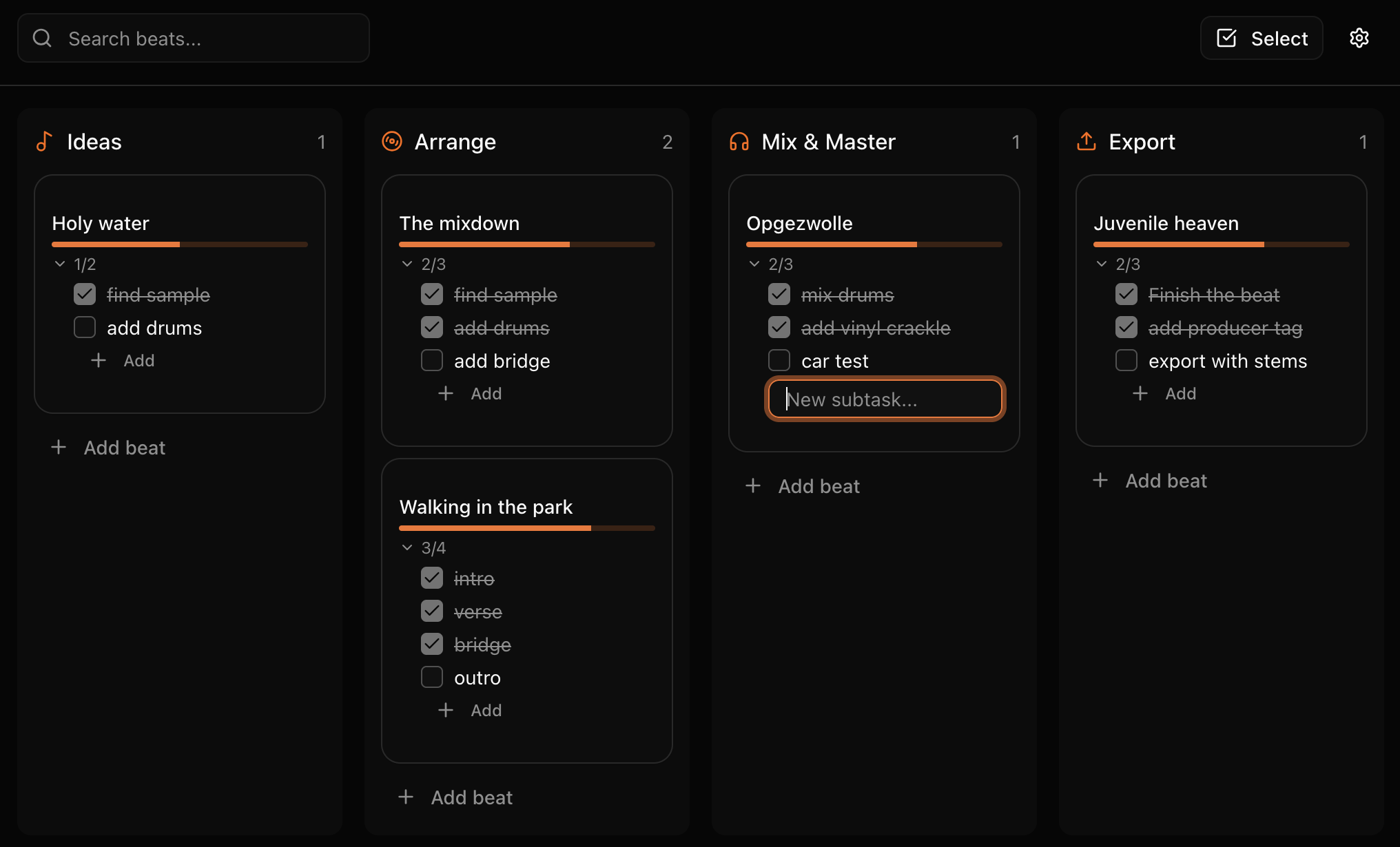
  • Visual workflow: drag and drop beats through your production stages. See your entire pipeline at a glance.
  • Custom columns: name and organize columns to match how you actually work. From "Ideas" to "Released".
  • Release tracking: know exactly which beats are ready to upload and which still need work.
BeatOps Kanban Board

Spend your time making beats

BeatOps handles everything after the bounce. Download free and see the difference.

Download BeatOps Free

Compare plans on our pricing page