
Upload everywhere from one place

Connect your YouTube, BeatStars, and SoundCloud accounts and upload directly from BeatOps. No more switching between tabs and copy-pasting.
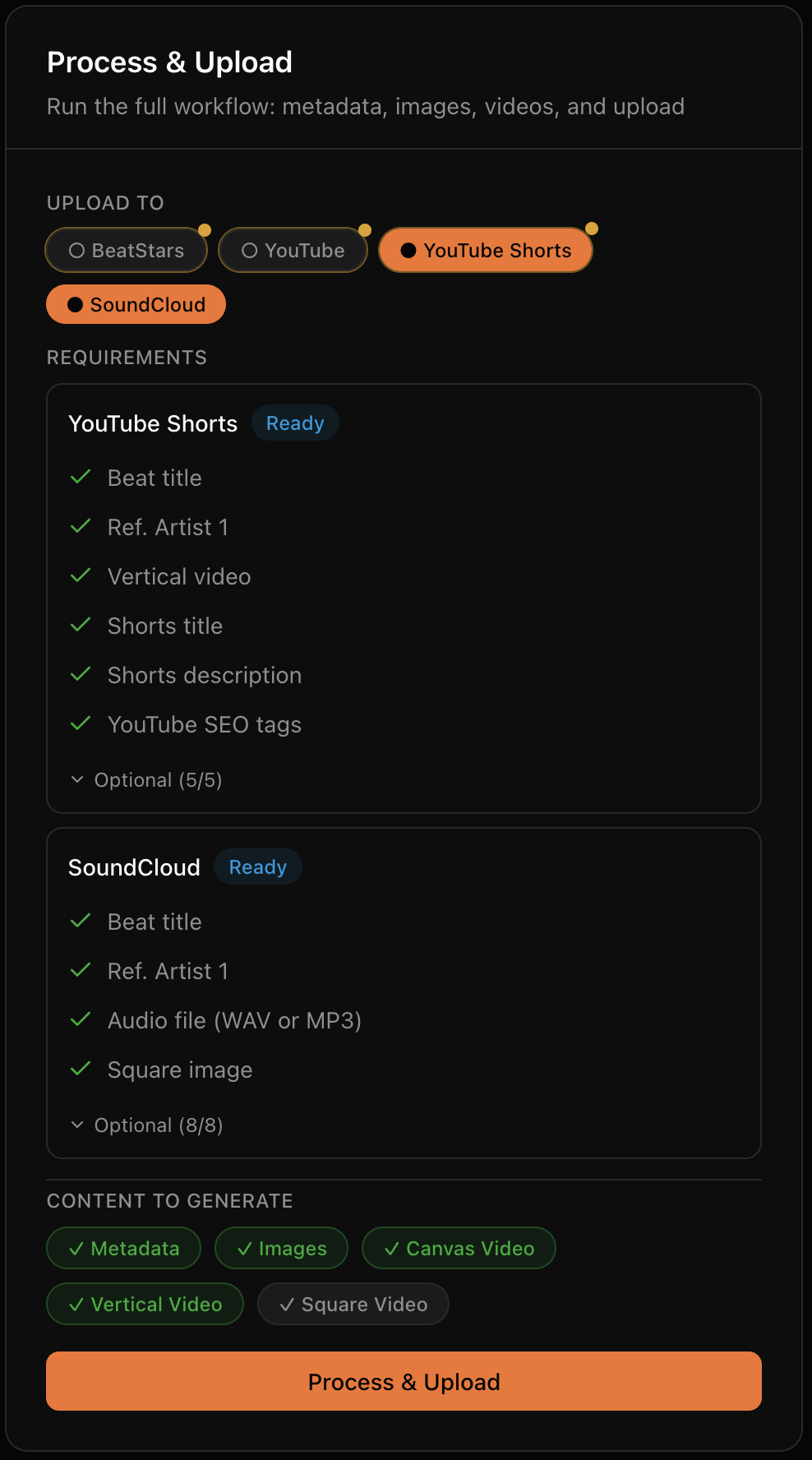
  • YouTube Main - Upload full-length beat videos with all metadata.
  • YouTube Shorts - Upload vertical videos to a separate Shorts channel, if you want to.
  • BeatStars - Upload beats with pricing, tags, and stems.
  • SoundCloud - Upload tracks with artwork, tags, and descriptions.
  • Scheduling - Set specific days and times for uploads. Build a consistent release schedule.
  • Status tracking - See upload progress and get direct links when complete.
BeatOps Process and Upload Flow

When you need to upload fast

You've got beats stacking up. BeatOps helps you clear the backlog quickly, so you can get back to making music instead of doing admin work.

  • Batch processing - Process multiple beats at once. Analyze and generate all content in one go.
  • One-click generation - Generate all images, videos, and metadata with a single action.
  • Template auto-fill - Titles, descriptions, and tags fill in automatically based on your templates.
  • Quick Actions - Common operations accessible from the dashboard without navigating away.
Before
40 min
After
2 min

When you need to look professional

Your beats deserve visuals that match. BeatOps generates consistent, professional thumbnails without requiring design skills.
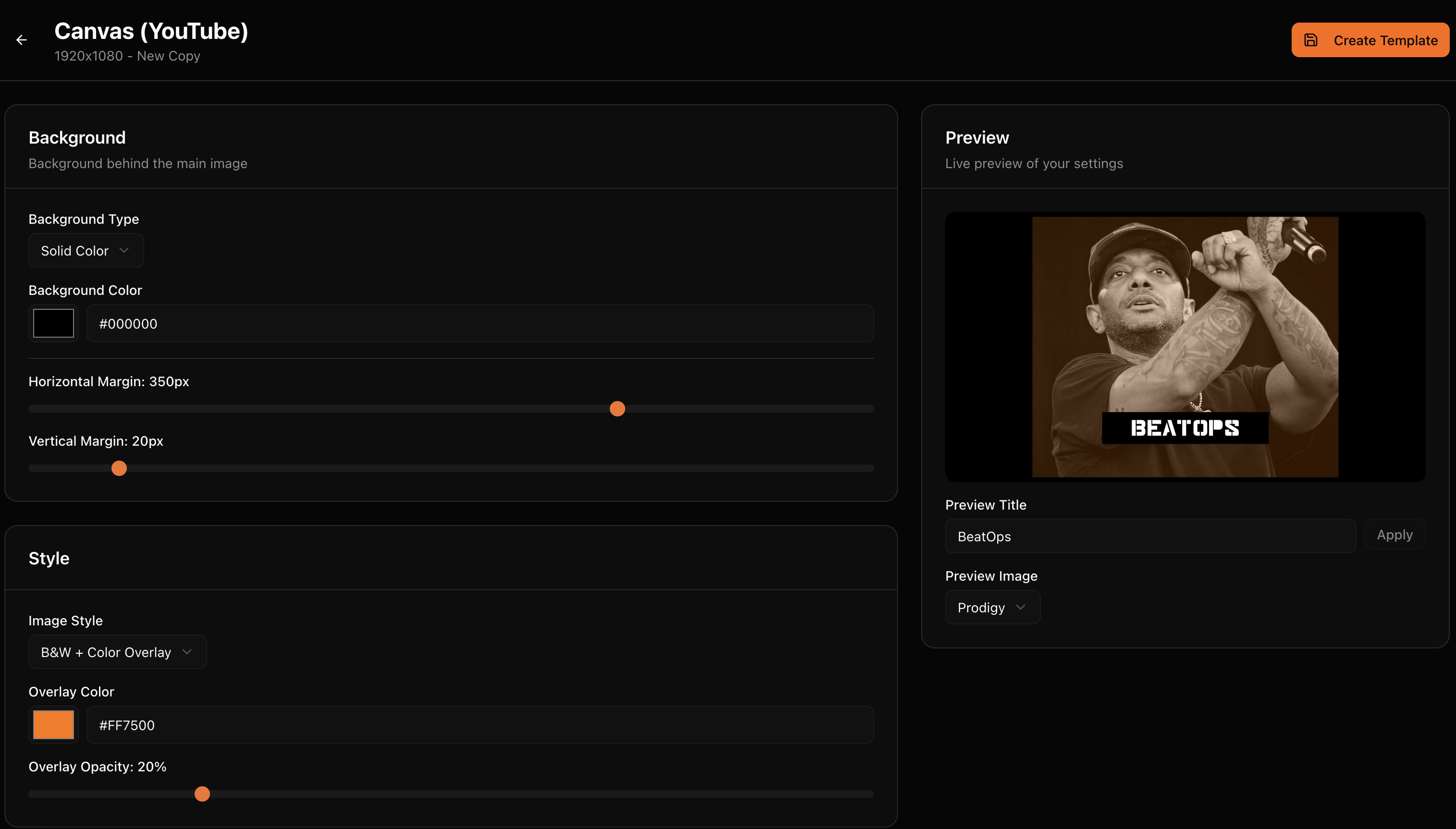
  • 3 thumbnail formats - Square (1:1) for BeatStars, Canvas (16:9) for YouTube, Vertical (9:16) for Shorts.
  • Visual styles - Choose from multiple aesthetics: B&W (with color overlay), Cinematic, Film Grain, Warm, Cool, and more.
  • Consistent branding - Your style applied to every beat automatically. Same look, zero effort.
  • Auto image search - Find relevant images to process automatically or upload your own.
BeatOps Template Editor

Let AI handle your uploads

Tell your AI agent to upload your beats. Used by Claude, Cursor, and more.

  • Release beats on autopilot - Set up batch automation and scheduling. Queue your releases, set your dates, and let BeatOps handle the rest.
  • Type one line. Upload everywhere. - beatops pipeline my-beat --to youtube,soundcloud handles analysis, thumbnails, video, tags, and upload in a single run.
  • The first AI-native beat platform - BeatOps speaks MCP - the protocol AI agents use to interact with tools. Connect it to Claude, Cursor, or any compatible AI.
Interfaces
3
Desktop + CLI + AI Agent
Your choice

When you need to stay organized

Beats, stems, images, videos: it adds up fast. BeatOps keeps everything organized so you can find what you need when you need it.

  • Auto file detection - Drop files in your beats folder. BeatOps scans and imports automatically.
  • Smart metadata extraction - Title, BPM, key, and artists parsed from your filename patterns.
  • Audio analysis - BPM, key, mood, and genre detected automatically from the audio itself.
  • Duplicate detection - Identifies duplicates by file hash and metadata. No accidental re-uploads.
  • Stems organization - Stems automatically linked to their parent beat and zipped for upload.
Organization
Automatic
Audio Formats
WAV / MP3
Detection
BPM + Key + Mood + Genre

When you need full control

Automation is great until you need something different. BeatOps gives you full control when you want it.

Per-beat overrides

Override any template setting for individual beats. Different title? Custom description? No problem.

Manual metadata

Edit BPM, key, mood, genre, and all other metadata manually whenever you prefer.

Custom images

Upload your own images instead of using auto-generated ones. Mix and match as needed.

Preview before upload

Review everything before it goes live. Change your mind? Edit and regenerate. Trust your setup? Enable auto-approve.

Automation Level
You Choose
Per-Beat Overrides
Supported

Set up once, use forever

Templates are the heart of BeatOps. Define your style once, and every beat follows the same format automatically.

  • Title templates - For YouTube Main, YouTube Shorts, BeatStars, and SoundCloud.
  • Description templates - With variables that auto-fill with beat data.
  • SEO tag templates - Consistent tags for better discoverability.
  • Image style templates - Your visual identity applied consistently.
  • Template Sets - Bundle everything together for different workflows or brands.
"{{ artist }} Type Beat - {{ title }}"

Variables are replaced with actual beat data when generating content.

Upload-ready videos, automatically

Turn your beats into YouTube-ready videos without video editing software.

  • Automatic generation - Combine your thumbnails with audio to create videos.
  • Three formats - Landscape (16:9) for YouTube, Vertical (9:16) for Shorts, Square (1:1) for BeatStars and SoundCloud.
  • Custom uploads - Already have a video? Upload it directly instead.
  • Progress tracking - See real-time status during video generation.
Output Format
MP4
Video Formats
3

Know what your audience wants

BeatOps tracks your performance across YouTube and SoundCloud, giving you data-driven insights in one dashboard. Performance Insights analyzes which genres, keys, BPMs, and moods drive the most engagement - so you know exactly what to produce next. BeatOps also means beating the competition, and data helps you do exactly that.
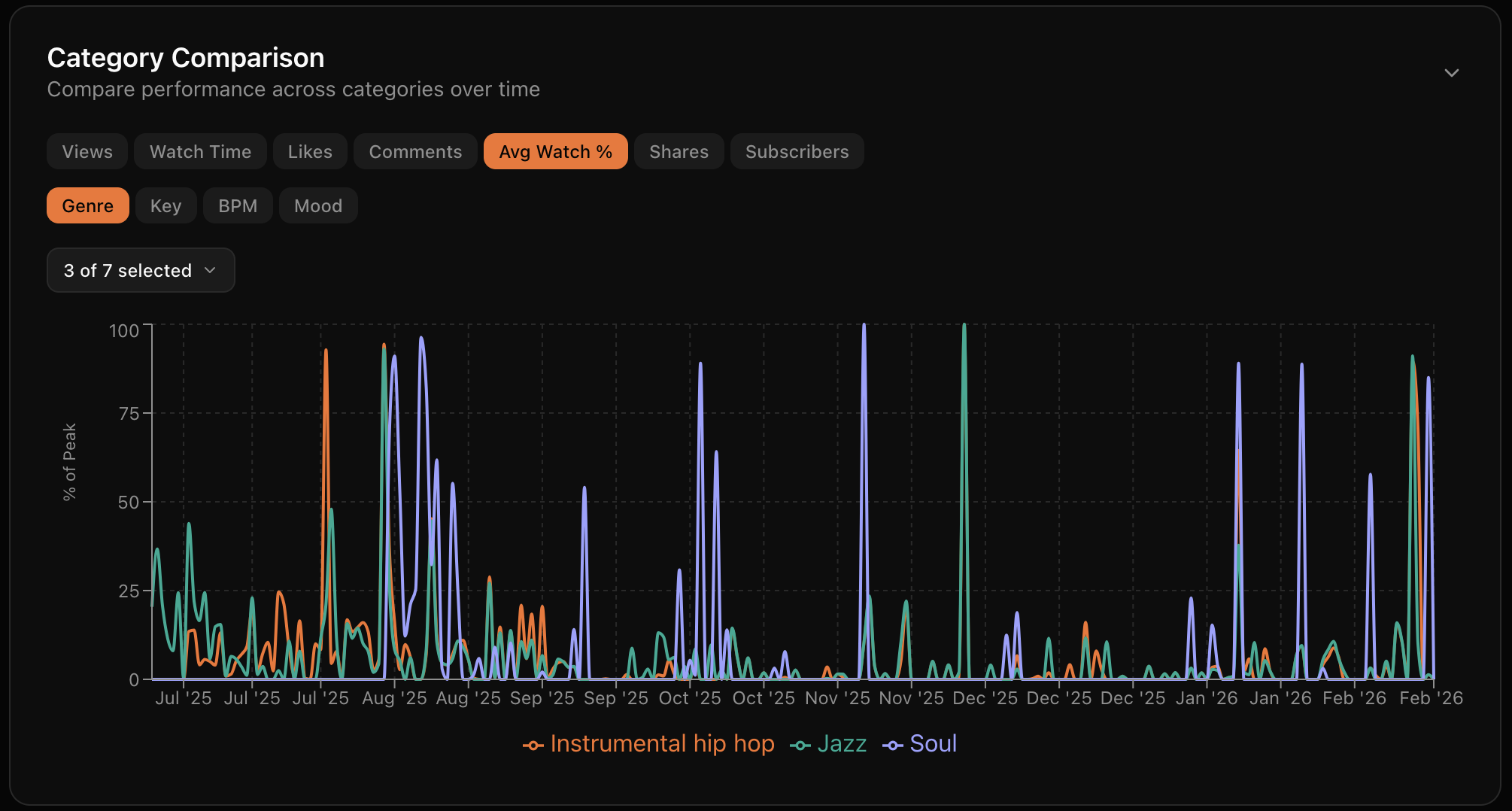
  • Cross-platform dashboard - YouTube and SoundCloud analytics in one view. Views, likes, comments, and engagement at a glance.
  • Performance Insights - See which genres, keys, BPMs, and moods drive the most engagement. Data-driven production decisions.
  • Hidden Gems - Find your underrated beats that deserve more attention based on engagement quality.
  • Trend tracking - Track how your catalog performs over time. Spot what's growing and what needs a push.
BeatOps Analytics Dashboard

Track every beat from idea to release

The kanban board lets you track beats through your entire production workflow - from the first recording to the final upload. Customize columns to match how you actually work, and always know which beats are ready to go.
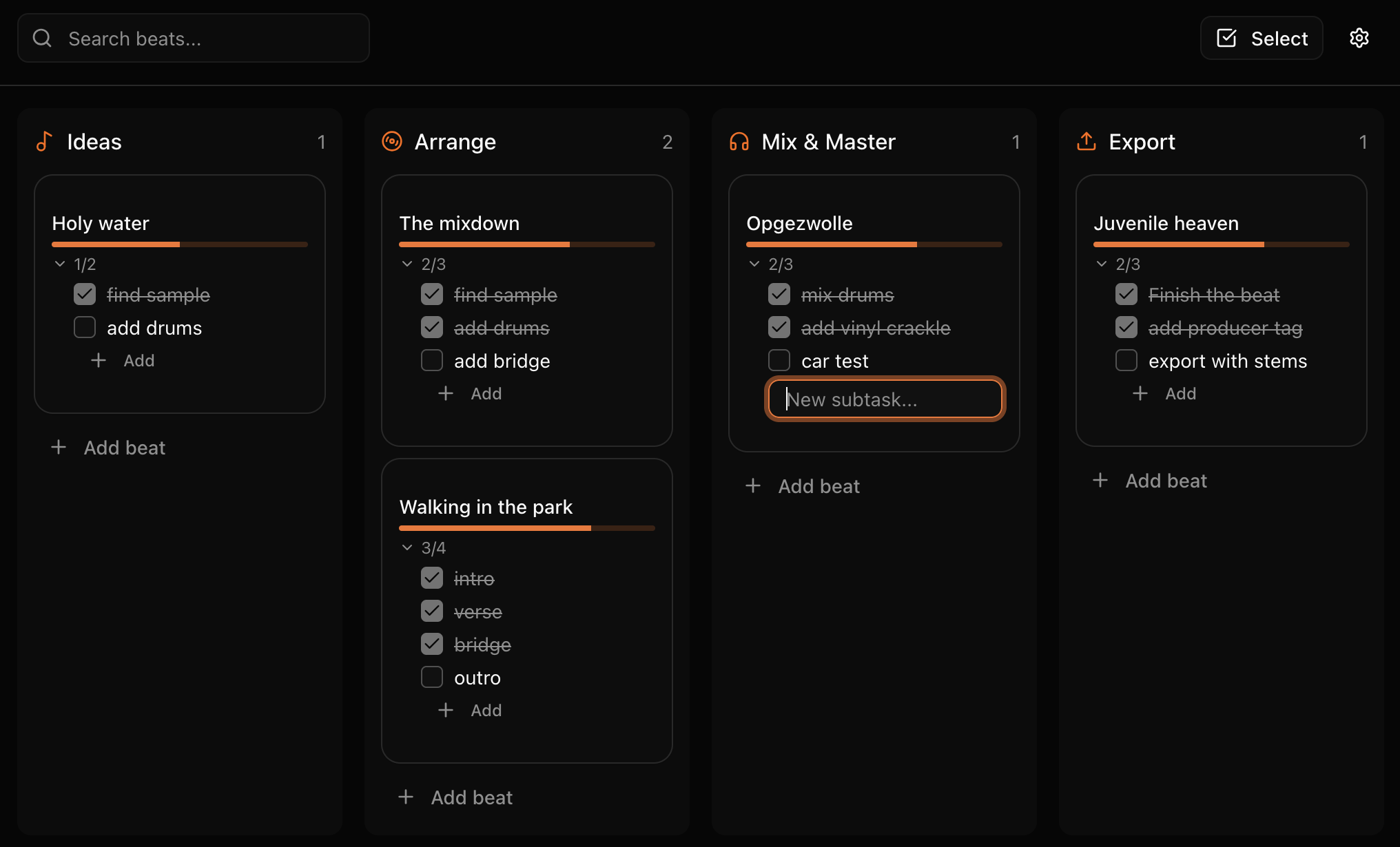
  • Visual workflow - Drag and drop beats through your production stages. See your entire pipeline at a glance.
  • Custom columns - Name and organize columns to match how you actually work. From "Ideas" to "Released".
  • Beat cards - Each card shows the beat's key info - title, BPM, key, and current status.
  • Release tracking - Know exactly which beats are ready to upload and which still need work.
BeatOps Kanban Board

Ready to level up your workflow?

Download BeatOps free and see the difference.

Download BeatOps Free

Compare plans on our pricing page